
Mobile applications have become an essential part of modern digital life. From banking and shopping to entertainment, education, healthcare, and business, people use smartphone apps for almost everything.
For developers and businesses planning to build a mobile application, one important question often comes first: Android vs iOS app development—which is better?
There is no universal answer. Android and iOS each have different development environments, programming languages, tools, app distribution systems, audiences, and business opportunities.
The right platform depends on your target users, budget, technical requirements, development team, and long-term goals.
In this guide, we will compare Android vs iOS app development, including programming languages, development tools, costs, testing, monetization, market reach, development time, security, and career opportunities.
What Is Android App Development?
Android app development involves creating applications for devices that use Google’s Android operating system.
Android powers smartphones, tablets, televisions, cars, watches, and other connected devices.
Developers commonly use Kotlin and Java for Android development, with Kotlin being Google’s recommended modern language for Android development.
Android applications are commonly developed using Android Studio, Google’s official integrated development environment.
One major advantage of Android development is the variety of devices available in the ecosystem. Developers can potentially reach users across many manufacturers, price ranges, and hardware configurations.
However, that variety also creates additional testing and compatibility considerations.
What Is iOS App Development?
iOS app development focuses on applications designed for Apple’s operating systems and devices, including the iPhone and iPad.
Developers primarily use Swift and Apple’s development tools to create modern iOS applications.
Apple’s development ecosystem is relatively controlled compared with Android. This means developers generally work with a more limited range of hardware configurations.
That can make testing and optimization more predictable.
Apple also maintains strict requirements for applications distributed through its App Store, which can influence how developers design, test, and publish their apps.
Android vs iOS: Key Differences
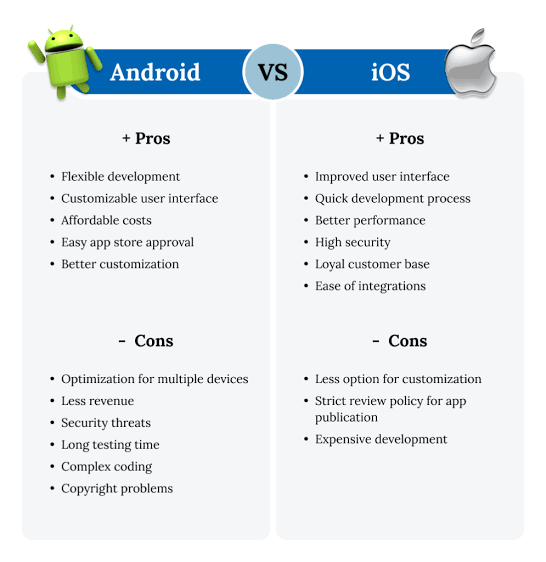
The biggest differences between Android and iOS development involve the development environment, programming languages, hardware ecosystem, distribution process, and target audience.
| Feature | Android Development | iOS Development |
|---|---|---|
| Primary language | Kotlin, Java | Swift |
| Main IDE | Android Studio | Xcode |
| Platform | Android | iOS/iPadOS |
| Hardware variety | Very high | More controlled |
| App distribution | Google Play and other channels | Apple App Store |
| Testing complexity | Often higher | Generally more predictable |
| Customization | Broad | More controlled |
| Market reach | Very large global reach | Strong presence in many premium markets |
| Development ecosystem | Open and diverse | Controlled and integrated |
| Common UI approach | Jetpack Compose / Android frameworks | SwiftUI / UIKit |
The exact development experience changes over time as both platforms introduce new tools and frameworks.
Programming Languages: Kotlin vs Swift
Programming language choice is one of the first decisions developers encounter.
Kotlin for Android
Kotlin is a modern programming language designed to be concise, expressive, and interoperable with Java.
It is widely used for modern Android development and works well with Google’s current Android development ecosystem.
Developers who already know Java may also find Kotlin easier to adopt.
Swift for iOS
Swift is Apple’s modern programming language for building applications across its platforms.
It is designed to be fast, expressive, and relatively approachable for developers learning Apple’s ecosystem.
Swift is commonly used with SwiftUI for modern interface development and with UIKit in many existing applications.
Which Language Is Easier?
Both Kotlin and Swift are modern languages with strong development ecosystems.
The better choice depends largely on your goals.
If you want to specialize in Android, learning Kotlin is a logical starting point. If your goal is Apple platform development, Swift is the natural choice.
Development Tools
Android Studio
Android Studio provides tools for writing, debugging, testing, profiling, and building Android applications.
It includes features such as:
- Code completion
- Debugging
- Emulator support
- Performance analysis
- Build tools
- Testing frameworks
- Project management
Xcode
Xcode is Apple’s primary development environment.
It includes tools for:
- Writing Swift code
- Designing interfaces
- Running simulators
- Debugging applications
- Testing performance
- Managing app builds
- Preparing apps for App Store distribution
Both development environments are powerful, but the workflow is different.
Development Cost
Development cost depends on the complexity of the application rather than simply the platform.
A basic application may require relatively little development work, while a complex app with user accounts, payments, real-time communication, artificial intelligence, location services, and advanced backend infrastructure can require a much larger budget.
There are also differences in the hardware and software developers may need.
For iOS development, developers generally need access to Apple’s development environment and compatible Apple hardware.
Android development can be performed across a broader range of computer hardware, although a capable development machine is still recommended for larger projects.
Businesses should therefore evaluate total development and maintenance costs rather than focusing only on initial development.
Development Time
Android development can sometimes require additional testing because Android devices vary considerably in:
- Screen sizes
- Hardware capabilities
- Operating system versions
- Manufacturer customizations
- Performance levels
iOS development generally involves a more controlled hardware ecosystem, which can simplify certain testing requirements.
However, development time depends heavily on the application itself.
A poorly planned iOS application can still take longer than a well-designed Android application.
User Reach
Android has a massive global presence and is particularly strong across many price segments and international markets.
This makes Android attractive for businesses seeking broad device coverage.
iOS has a strong user base in markets where Apple devices are particularly popular and is especially significant in premium smartphone segments.
When deciding between platforms, businesses should not rely only on global statistics.
The most important question is:
Where are your target customers?
If your customers primarily use Android, Android development should receive priority. If your target audience heavily uses iPhones, iOS may be the better starting point.
App Monetization
Both platforms provide multiple ways to make money from applications.
Common models include:
- Paid downloads
- In-app purchases
- Subscriptions
- Advertising
- Freemium features
- E-commerce
- Service-based revenue
The most effective monetization strategy depends on the type of application.
For example, a productivity application may work well with subscriptions, while a casual game might combine advertising with optional in-app purchases.
Developers should also account for platform rules and applicable fees when planning revenue.
Android vs iOS for App Revenue
The revenue potential of an app depends on many factors, including the target market, pricing model, audience, product quality, and marketing strategy.
Businesses targeting users who are more likely to pay for premium digital services may find iOS particularly attractive.
On the other hand, Android’s broad global reach can provide access to a huge potential user base.
The best platform is therefore the one that aligns with your business model and target customers.
Security: Android vs iOS
Both Android and iOS provide strong security technologies, but their ecosystems operate differently.
Apple maintains substantial control over its hardware and software environment. This centralized approach can make it easier to enforce certain security and distribution policies.
Android uses a more diverse hardware ecosystem and provides multiple layers of security, including application sandboxing, permissions, verified boot, and other platform protections.
Developers on both platforms are responsible for building secure applications.
Important practices include:
- Secure authentication
- Encrypted communication
- Safe data storage
- Proper permission management
- Secure API design
- Regular dependency updates
- Input validation
- Protection of sensitive credentials
Security should be considered from the beginning of development rather than added after the application is completed.
User Interface and User Experience
Android and iOS users are accustomed to different design conventions.
iOS applications often follow Apple’s Human Interface Guidelines and emphasize consistency within the Apple ecosystem.
Android applications commonly follow Google’s Material Design principles.
Developers should not simply copy the same interface onto both platforms.
A good cross-platform strategy should respect the expectations and interaction patterns of each platform.
Android vs iOS for Startups
Startups often have limited budgets, making platform selection particularly important.
If the startup has enough resources, launching on both platforms may provide broader market coverage.
However, developing two native applications simultaneously can increase costs and complexity.
A startup may choose one platform first, validate the product, and expand later.
The best first platform should be selected based on:
- Target customers
- Market demand
- Revenue model
- Development resources
- Product requirements
- Geographic location
Native vs Cross-Platform Development
Businesses do not always have to choose between Android and iOS development separately.
Cross-platform frameworks allow developers to build applications that target multiple platforms from a shared codebase.
Popular options include technologies such as:
- Flutter
- React Native
- .NET MAUI
Cross-platform development can reduce duplicated development work, although it is not always the best choice.
Native development may be preferable when an application requires highly specialized platform features, maximum performance, or deep integration with a specific operating system.
Android vs iOS: Which Is Easier to Learn?
For beginners, both platforms have learning curves.
Android development requires understanding Kotlin, Android Studio, application architecture, UI development, APIs, and Android-specific concepts.
iOS development involves Swift, Xcode, SwiftUI or UIKit, Apple’s frameworks, and App Store requirements.
Your existing experience matters.
A developer familiar with Java may find Kotlin comfortable. Someone interested in Apple’s ecosystem may enjoy learning Swift.
The best way to decide is to build a small project on each platform and see which development workflow you prefer.
Career Opportunities
Both Android and iOS development can provide strong career opportunities.
Android developers can work on:
- Mobile applications
- Financial apps
- E-commerce platforms
- Games
- Enterprise applications
- IoT products
iOS developers can work on:
- Consumer applications
- Business applications
- Financial technology
- Healthcare applications
- Games
- Productivity software
Developers can also move into related careers such as mobile engineering, software architecture, product development, technical leadership, and cross-platform development.
How to Choose Between Android and iOS Development
Use these questions to guide your decision.
Choose Android First If:
- Your target users primarily use Android devices.
- You want broad international device coverage.
- You are interested in Kotlin.
- You want to work across a highly diverse hardware ecosystem.
- Your project benefits from Android’s broader device availability.
Choose iOS First If:
- Your target customers primarily use iPhones.
- You want to specialize in Apple’s ecosystem.
- You are interested in Swift.
- Your business targets premium smartphone users.
- You prefer a more controlled hardware environment.
Consider Cross-Platform If:
- You need Android and iOS at the same time.
- Development resources are limited.
- Your application does not require highly specialized native features.
- You want to share a significant portion of your codebase.
Common Mistakes in Mobile App Development
One common mistake is choosing a platform without researching the target audience.
Another is focusing too much on features and not enough on user experience.
Developers should also avoid ignoring performance, accessibility, security, and testing.
Launching quickly can be useful, but rushing an application without adequate testing can create poor reviews and expensive maintenance problems.
Final Thoughts
The Android vs iOS app development debate does not have a single winner.
Android offers broad global reach, diverse hardware, and a flexible ecosystem. iOS offers a more controlled environment, strong integration with Apple’s products, and a consistent development and user experience.
For developers, the best choice depends on the skills they want to build and the type of applications they want to create. For businesses, the target audience and revenue model should guide the decision.
If you are still unsure, start with a small project. Build a simple application using Kotlin and Android Studio, then experiment with Swift and Xcode. The experience will give you a much better understanding of which platform fits your goals.
Ultimately, successful app development is less about choosing the “perfect” platform and more about creating an application that is secure, useful, reliable, fast, and genuinely valuable to its users.