Introduction to Online Storage
In today’s digital world, data has become one of the most valuable assets for individuals, businesses, students, and organizations. Every day, millions of people create and store different types of digital files, including photos, videos, documents, business records, applications, and personal information. Managing this growing amount of data has become a major challenge, especially when traditional storage devices have limited space and can be damaged or lost.
This is where Online Storage plays an important role. Online Storage allows users to save their files on secure internet-based servers instead of depending only on physical devices like hard drives, USB drives, or memory cards. With Online Storage, people can access their important data anytime and from almost anywhere using an internet connection.
The popularity of Online Storage has increased rapidly because it offers convenience, flexibility, security, and easy data management. From personal users storing family memories to large companies managing important business information, Online Storage has become an essential technology in modern life.
What Is Online Storage?
Online Storage is a digital service that allows users to store files, documents, images, videos, and other data on remote servers connected through the internet. Instead of saving information directly on a computer or physical storage device, users upload their data to online platforms where it is maintained and protected.
These online servers are managed by technology companies that provide storage space, security systems, backups, and access tools. Users can log into their accounts through websites or mobile applications to upload, download, edit, and share their files.
The main purpose of Online Storage is to provide a simple and reliable way to store data without worrying about limited device storage or hardware failures.
How Does Online Storage Work?
Online Storage works through a combination of internet technology, data centers, servers, and security systems. When a user uploads a file to an online storage service, the file is transferred through the internet and stored on powerful servers located in secure data centers.
Most Online Storage systems follow these basic steps:
1. Uploading Data
Users select files from their devices and upload them to an Online Storage platform. The data is transferred securely using internet connections.
2. Data Processing
The storage provider processes the uploaded information and organizes it within the user’s account. Advanced systems may divide files into smaller parts and store copies in different locations.
3. Secure Storage
The uploaded data is stored on servers protected by security technologies such as encryption, authentication systems, and monitoring tools.
4. Accessing Files
Users can access their stored files anytime by signing into their account from computers, smartphones, tablets, or other internet-connected devices.
Why Is Online Storage Important?
Online Storage has changed the way people handle digital information. In the past, users depended heavily on physical storage devices, which could easily become damaged, lost, or outdated. Today, Online Storage provides a safer and more convenient alternative.
Some important reasons why Online Storage is valuable include:
Easy Access Anywhere
One of the biggest advantages of Online Storage is accessibility. Users do not need to carry physical storage devices everywhere. They can access their files from home, office, school, or while traveling.
Protection Against Data Loss
Computer crashes, damaged hard drives, accidental deletion, and theft can cause serious data loss. Online Storage helps reduce these risks by keeping files safely stored on remote servers.
Saving Device Space
Modern devices often contain large amounts of data, which can slow performance. Online Storage helps free up device space by moving files to the cloud.
Simple File Sharing
Online Storage makes sharing files easier. Users can send links instead of attaching large files through emails or transferring data through external devices.
Types of Online Storage
Online Storage comes in different forms depending on user needs and requirements.
Personal Online Storage
Personal Online Storage is designed for individual users who want to save personal files such as photos, videos, documents, and backups.
Common uses include:
- Saving family pictures
- Storing personal documents
- Keeping phone backups
- Organizing important files
Business Online Storage
Businesses use Online Storage to manage company data, collaborate with teams, and improve productivity.
Companies can use it for:
- Employee file sharing
- Document management
- Project collaboration
- Business backups
Private Online Storage
Private Online Storage provides more control and customization. Organizations that require advanced security often choose private storage solutions.
Hybrid Online Storage
Hybrid Online Storage combines private and public storage methods. It allows organizations to keep sensitive information private while using public storage for general data.
Benefits of Using Online Storage
Online Storage provides many benefits that make digital life easier and more efficient.
Cost Efficiency
Buying and maintaining physical storage equipment can be expensive. Online Storage allows users to pay according to their storage needs without investing heavily in hardware.
Automatic Backup
Many Online Storage services provide automatic backup features. This means important files can be saved regularly without manual effort.
Better Collaboration
Teams can work together more effectively because multiple users can access and edit shared files from different locations.
Scalability
Online Storage can grow with user requirements. Individuals and businesses can increase storage capacity whenever needed.
Security Features in Online Storage
Security is one of the most important factors when choosing an Online Storage service. Reliable providers use advanced technologies to protect user information.
Important security features include:
- Data encryption
- Password protection
- Two-factor authentication
- Regular backups
- Access control systems
Users should always choose trusted storage providers and follow good security practices to protect their accounts.
Advanced Features, Uses, and Choosing the Right Online Storage Solution
Key Features to Look for in Online Storage
Choosing the right Online Storage service is important because different users have different needs. Some people need storage for personal photos and documents, while businesses may require advanced collaboration and security features.
Before selecting an Online Storage solution, users should understand the most important features.
1. Storage Capacity

Storage capacity is one of the first things users consider. Different Online Storage providers offer different amounts of space based on their plans.
A person who only wants to store documents may need a small amount of storage, while photographers, video creators, and businesses may require hundreds of gigabytes or even terabytes of space.
A good Online Storage service should allow users to upgrade their storage when their requirements increase.
2. Data Security
Security is a major concern in the digital world. People store personal and professional information online, so protecting this data is extremely important.
Reliable Online Storage platforms use different security methods, including:
- File encryption
- Secure login systems
- Identity verification
- Monitoring against unauthorized access
- Regular security updates
Strong security helps users keep their private information protected from cyber threats.
3. Automatic Synchronization
Synchronization is a useful feature that keeps files updated across multiple devices.
For example, if a user edits a document on a laptop, the updated version can automatically appear on a smartphone or tablet connected to the same Online Storage account.
This feature saves time and prevents confusion caused by outdated files.
4. File Sharing Options
Modern Online Storage services make collaboration easier through simple sharing features.
Users can share files with:
- Friends
- Family members
- Employees
- Business partners
- Customers
Many platforms allow users to control permissions, such as whether others can view, edit, or download files.
5. Backup and Recovery
Accidental deletion and hardware failures can create serious problems. Backup and recovery features help users restore important files when needed.
A reliable Online Storage solution should provide:
- Automatic backups
- Deleted file recovery
- Previous file versions
- Data restoration options
These features provide extra protection against unexpected data loss.
Common Uses of Online Storage
Online Storage is used in many areas of life. From personal activities to professional environments, it provides solutions for different storage challenges.
Online Storage for Personal Use
Individuals use Online Storage for managing their everyday digital information.
Popular personal uses include:
Storing Photos and Videos
Smartphones allow people to capture thousands of photos and videos. However, device storage can quickly become full.
Online Storage helps users save memories safely while keeping their devices free.
Saving Important Documents
People often need access to important files such as:
- Educational certificates
- Identification documents
- Financial records
- Personal notes
Keeping copies in Online Storage provides extra protection.
Mobile Device Backup
Phones contain valuable information, including contacts, pictures, and applications. Online Storage can help create backups that can be restored when changing or losing a device.
Online Storage for Students
Students generate a large amount of digital content, including assignments, research papers, presentations, and study materials.
Online Storage helps students by allowing them to:
- Access notes from anywhere
- Share assignments easily
- Organize academic files
- Protect important projects
Students no longer need to carry USB drives or worry about losing their work.
Online Storage for Businesses
Businesses depend heavily on digital information. Losing important company data can affect productivity and financial performance.
Online Storage helps organizations manage information more effectively.
Team Collaboration
Employees can work together on documents and projects even when they are located in different places.
Team members can:
- Share files instantly
- Edit documents together
- Manage project resources
- Communicate more efficiently
Business Data Protection
Companies store valuable information such as:
- Customer records
- Financial reports
- Marketing materials
- Employee documents
Online Storage provides backup and security solutions to protect this information.
Remote Work Support
Remote work has become common worldwide. Online Storage allows employees to access company files without being physically present in an office.
This flexibility improves productivity and supports modern work environments.
Online Storage vs Traditional Storage
Traditional storage methods include hard drives, USB devices, CDs, and memory cards. Although these devices are still used, Online Storage offers several advantages.
Accessibility
Traditional storage devices must be physically carried. Online Storage allows access through the internet from multiple locations.
Durability
Physical devices can break due to accidents, damage, or technical problems. Online Storage reduces dependence on physical hardware.
Sharing
Sharing files through traditional devices can be slow and inconvenient. Online Storage provides faster sharing options.
Maintenance
Physical storage requires replacement and maintenance. Online Storage providers handle server management and technical maintenance.
How to Choose the Best Online Storage Service
Selecting the right Online Storage service depends on personal needs, budget, and security requirements.
Consider these factors before making a decision:
Understand Your Storage Needs
First, determine how much space you require.
Ask yourself:
- What type of files will I store?
- How much data do I have?
- Will my storage needs increase in the future?
Understanding your needs prevents paying for unnecessary storage.
Check Security Standards
Always review the security features of an Online Storage provider.
Look for services that offer:
- Strong encryption
- Account protection
- Privacy controls
- Reliable backup systems
Compare Pricing Plans
Different providers offer different pricing structures. Some provide free storage with limited space, while others offer premium plans with advanced features.
Compare:
- Storage amount
- Monthly costs
- Additional features
- Long-term value
Review Compatibility
A good Online Storage platform should work smoothly with your devices.
Check whether it supports:
- Windows computers
- Mac systems
- Android phones
- iOS devices
- Web browsers
Future of Online Storage
The future of Online Storage looks promising as digital data continues to increase worldwide.
New technologies are improving storage systems by making them:
- Faster
- More secure
- More affordable
- Easier to use
Artificial intelligence, automation, and advanced security methods are expected to improve the Online Storage experience even further.
Businesses and individuals will continue depending on Online Storage because digital information is becoming more important every year.
Frequently Asked Questions (FAQs) About Online Storage
1. What is Online Storage?
Online Storage is a digital service that allows users to save, manage, and access their files through the internet. Instead of storing data on physical devices, users can keep their documents, photos, videos, and other files on secure online servers.
2. Is Online Storage safe to use?
Yes, Online Storage is generally safe when users choose trusted providers and use security features like strong passwords, encryption, and two-factor authentication. These features help protect personal and business data from unauthorized access.
3. What are the main benefits of Online Storage?
The main benefits of Online Storage include easy access from anywhere, automatic backups, file sharing, saving device space, better collaboration, and protection against data loss caused by hardware problems.
4. Can Online Storage be used for business purposes?
Yes, businesses commonly use Online Storage to store important files, manage projects, share documents with teams, and protect company data. It also supports remote work by allowing employees to access files from different locations.
5. How much Online Storage do I need?
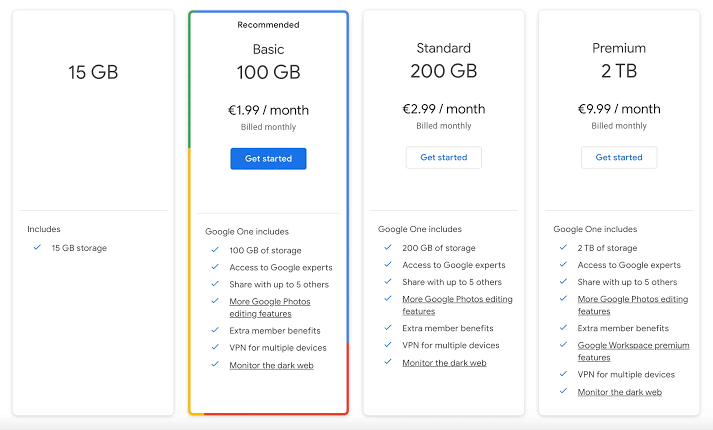
The required amount of Online Storage depends on your needs. Basic users may need space for documents and photos, while professionals and businesses may require larger storage capacity for videos, databases, and company files.
Conclusion
Online Storage has become an essential solution for managing digital data in today’s connected world. It provides secure storage, easy access, backup protection, and flexible file management. Whether for personal use, education, or business, Online Storage helps users protect valuable information and improve productivity with modern technology.