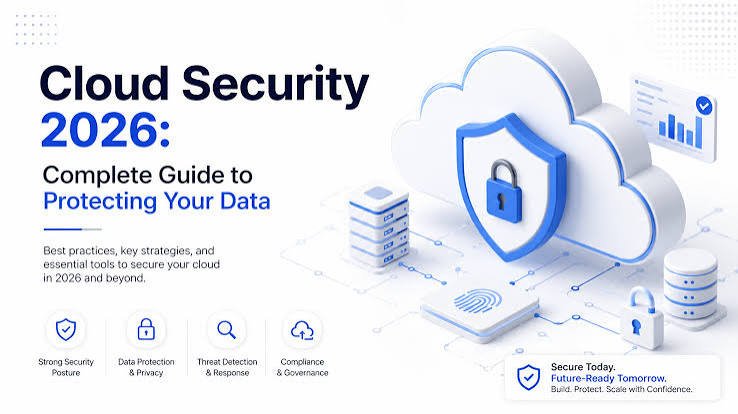
Introduction: Why Cloud Backup Has Become Essential Today
In today’s digital age, data has become one of the most valuable assets for individuals, businesses, and organizations. Every day, millions of people create and store important files, including personal photos, business documents, financial records, customer information, videos, and application data. However, storing data only on computers, hard drives, or local servers can create serious risks. Hardware failure, cyberattacks, accidental deletion, natural disasters, and system crashes can cause permanent data loss.
This is where Cloud Backup plays an important role.
Cloud Backup is a modern data protection solution that allows users to store copies of their important files and information on secure remote servers through the internet. Instead of depending only on physical storage devices, cloud backup provides a safer, flexible, and convenient way to protect digital information.
Whether you are a home user protecting family memories or a large company managing critical business data, cloud backup offers reliability, accessibility, and peace of mind.
What Is Cloud Backup?
Cloud Backup is a service that creates a copy of your data and stores it on cloud-based servers managed by a third-party provider. These servers are located in secure data centers and can be accessed whenever needed through an internet connection.
Unlike traditional backup methods, such as external hard drives or USB devices, cloud backup does not require users to manually transfer files. Most cloud backup services automatically upload and synchronize data according to a scheduled time or real-time settings.
For example, if your computer suddenly stops working, your files are not permanently lost because a protected copy already exists in the cloud. You can restore your information to a new device quickly and continue your work.
Cloud backup is widely used for:
- Personal file protection
- Business data security
- Website backups
- Database protection
- Disaster recovery
- Remote work environments
- Enterprise-level data management
How Does Cloud Backup Work?
Understanding how cloud backup works helps users choose the right solution for their needs.
The process usually includes several important steps:
1. Data Selection
First, users select the files, folders, applications, or systems they want to protect. Some cloud backup solutions allow complete device backups, while others focus on specific files.
Examples include:
- Documents
- Images
- Videos
- Emails
- Databases
- Business applications
2. Data Encryption
Before transferring information to cloud servers, many backup systems encrypt the data. Encryption converts files into a secure format that prevents unauthorized access.
This security method helps protect sensitive information from hackers and cyber threats.
3. Data Transfer
After encryption, the files are uploaded through an internet connection to remote cloud servers. Modern cloud backup systems use advanced technologies to make uploads faster and more efficient.
Many services use:
- Data compression
- Incremental backup
- Deduplication technology
These methods reduce storage usage and improve backup speed.
4. Secure Cloud Storage
Once uploaded, data is stored inside professional data centers. These facilities usually include:
- Physical security systems
- Backup power systems
- Network protection
- Monitoring systems
- Multiple storage locations
This ensures that data remains available even if one location experiences a problem.
5. Data Recovery
The main purpose of cloud backup is easy recovery. When users lose files because of accidental deletion, hardware failure, or cyberattacks, they can restore their information from the cloud.
A good cloud backup service allows:
- Fast file restoration
- Multiple recovery points
- Device recovery
- Remote access
Why Is Cloud Backup Important?
Data loss can happen unexpectedly. Many users believe their files are safe because they are stored on computers or local drives, but these devices can fail at any time.
Cloud backup provides an additional layer of protection.
Protection Against Hardware Failure
Hard drives, laptops, and storage devices have limited lifespans. A damaged storage device can result in the loss of years of important data.
Cloud backup keeps another copy of your files away from your physical device, reducing the risk of permanent loss.
Protection Against Cyber Threats
Cyber threats such as ransomware have become major concerns for businesses and individuals. Attackers may lock files and demand payment for access.
A secure cloud backup system allows users to restore clean copies of their data without depending on attackers.
Easy Access From Anywhere
One major advantage of cloud backup is accessibility.
Users can access their files from:
- Computers
- Smartphones
- Tablets
- Remote locations
This feature is especially useful for businesses with employees working from different locations.
Automatic Backup Saves Time
Traditional backup methods require manual effort. Many people forget to create backups regularly, increasing the risk of losing important information.
Cloud backup can automatically protect files according to a schedule, ensuring continuous data protection.
Benefits of Cloud Backup
Cloud backup offers many advantages compared with traditional storage methods.
1. Improved Data Security
Security is one of the biggest benefits of cloud backup. Professional providers use advanced security technologies to protect stored information.
Common security features include:
- Encryption
- Password protection
- Access control
- Multi-factor authentication
- Monitoring systems
2. Cost-Effective Storage Solution
Maintaining physical servers and storage equipment can be expensive. Businesses need to spend money on hardware, maintenance, electricity, and technical support.
Cloud backup reduces these costs because users pay for the storage they need without managing physical infrastructure.
3. Scalability
Data requirements continue to grow every year. Cloud backup allows users to increase storage capacity whenever required.
A small business can start with limited storage and expand as it grows.
4. Disaster Recovery Support
Natural disasters, fires, floods, and accidents can damage physical equipment. Cloud backup keeps data stored at remote locations, making recovery easier after unexpected events.
5. Better Business Continuity
For companies, losing important data can stop daily operations. Cloud backup helps businesses recover quickly and continue services with minimal interruption.
Cloud Backup vs Traditional Backup
Many people compare cloud backup with traditional backup methods. Both have advantages, but cloud backup provides additional flexibility.
| Feature | Cloud Backup | Traditional Backup |
|---|---|---|
| Storage Location | Remote servers | Local devices |
| Accessibility | Anywhere with internet | Limited access |
| Automation | Automatic | Often manual |
| Maintenance | Managed by provider | User responsibility |
| Scalability | Easy expansion | Hardware replacement needed |
| Disaster Protection | High | Limited |
Cloud backup is becoming increasingly popular because it provides convenience, security, and reliability.
Types of Cloud Backup
Cloud backup is available in different forms depending on user requirements. Individuals, small businesses, and large organizations can choose a backup method that matches their data protection needs.
1. Full Cloud Backup
A full cloud backup creates a complete copy of all selected data and stores it in the cloud. This includes files, folders, applications, and sometimes entire operating systems.
The main advantage of a full backup is simple recovery. If a device fails or data is deleted, users can restore everything from one complete backup.
Advantages of Full Cloud Backup:
- Complete data protection
- Easy recovery process
- Suitable for important systems
- Reduces the risk of missing files
However, full backups usually require more storage space and may take longer to complete compared with other backup methods.
2. Incremental Cloud Backup
Incremental cloud backup only saves the changes made after the previous backup. Instead of uploading all files again, it uploads only new or modified data.
For example, if you edit five documents after a backup, the next backup will only save those changes.
Benefits of Incremental Backup:
- Faster backup speed
- Less internet usage
- Lower storage requirements
- Efficient data management
Incremental backup is commonly used by businesses that generate large amounts of data every day.
3. Differential Cloud Backup
Differential backup stores all changes made since the last full backup.
It is different from incremental backup because each backup contains all changes from the original full backup.
Example:
A company creates a full backup on Monday.
- Tuesday backup saves Tuesday changes.
- Wednesday backup saves Tuesday and Wednesday changes.
- Thursday backup saves Tuesday, Wednesday, and Thursday changes.
Differential backups provide a balance between full and incremental backup methods.
4. Hybrid Cloud Backup
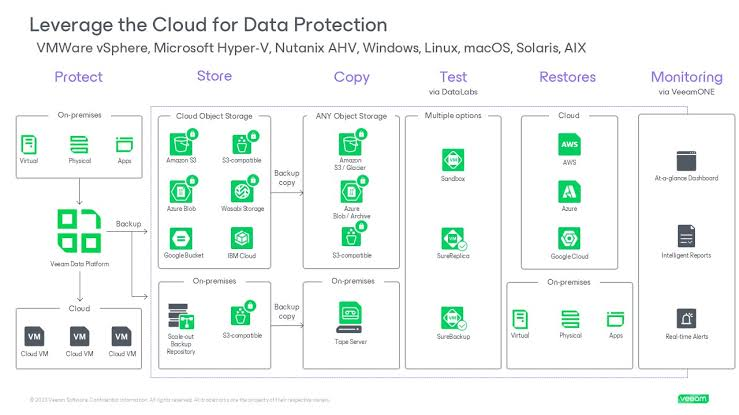
Hybrid cloud backup combines local storage with cloud storage. It provides both fast local recovery and secure off-site protection.
Many businesses use hybrid backup because it offers flexibility.
For example:
- Frequently used files can be stored locally for quick access.
- Important backup copies can be stored in the cloud for disaster recovery.
5. Automatic Cloud Backup
Automatic cloud backup works without requiring regular manual action from users.
The system automatically uploads files based on selected settings.
Common scheduling options include:
- Daily backup
- Weekly backup
- Real-time backup
- Continuous backup
Automatic backup helps prevent situations where users forget to protect important data.
Important Features of a Good Cloud Backup Service
Choosing the right cloud backup solution requires understanding important features.
A reliable cloud backup service should include the following capabilities:
Data Encryption
Encryption is one of the most important security features in cloud backup.
It protects information by converting data into an unreadable format that can only be accessed with proper authorization.
Many professional backup systems use encryption:
- During file transfer
- While storing data
- During recovery
This reduces the risk of unauthorized access.
Automatic Synchronization
Synchronization keeps files updated across different devices.
For example, if you update a document on your laptop, the latest version can automatically become available on other connected devices.
This feature improves productivity for remote workers and businesses.
Version History
Version history allows users to access previous versions of files.
This is useful when:
- A file is accidentally changed
- Important information is deleted
- A document needs an older version
Instead of losing previous work, users can restore earlier copies.
File Recovery Options
A quality cloud backup service should provide simple recovery options.
Recovery features may include:
- Individual file restoration
- Complete system recovery
- Multiple device recovery
- Deleted file recovery
Fast recovery reduces downtime and improves efficiency.
Mobile Access
Modern users need access to information from different devices.
Many cloud backup platforms provide mobile applications that allow users to:
- View stored files
- Download documents
- Manage backups
- Restore information
Mobile access makes data management easier for people who work remotely.
Cloud Backup Security
Security is a major concern when storing data online. A trusted cloud backup system uses multiple layers of protection to keep information safe.
Encryption Technology
Encryption protects data from unauthorized users. Even if someone gains access to stored information, encrypted files remain difficult to understand without the correct security key.
Multi-Factor Authentication
Multi-factor authentication adds an extra security layer by requiring more than one verification method.
For example:
- Password
- Mobile verification code
- Security confirmation
This reduces the chances of unauthorized account access.
Secure Data Centers
Cloud backup providers store information in professional data centers designed for security and reliability.
These facilities often include:
- Controlled access
- Security monitoring
- Backup electricity systems
- Climate control
- Network protection
Regular Security Updates
Technology threats continue to evolve. Cloud backup providers regularly update their systems to improve protection against new risks.
Security maintenance helps keep stored data protected over time.
Cloud Backup for Businesses
Businesses generate large amounts of valuable information every day. Customer records, financial documents, employee information, and operational files require strong protection.
Cloud backup has become an important part of modern business strategies.
Protecting Business Data
Companies cannot afford major data loss. Losing important information can result in:
- Financial damage
- Customer trust issues
- Operational delays
- Legal problems
Cloud backup provides a reliable solution for protecting business information.
Supporting Remote Work
Remote work has increased the need for secure access to company files.
Employees can access protected data from different locations while maintaining security standards.
Cloud backup supports:
- Remote employees
- Distributed teams
- Online collaboration
- Flexible working environments
Disaster Recovery Planning
Every organization should have a disaster recovery plan.
Cloud backup helps companies recover after:
- Server failure
- Cyberattacks
- Natural disasters
- Hardware damage
A strong recovery system helps businesses return to normal operations quickly.
Cloud Backup for Small Businesses
Small businesses often have limited budgets and technical resources. Cloud backup provides enterprise-level protection without requiring expensive equipment.
Benefits for small businesses include:
- Affordable storage
- Simple management
- Automatic protection
- Reduced maintenance costs
Small companies can protect important data without hiring large IT teams.
Common Mistakes People Make With Cloud Backup
Although cloud backup is powerful, users can make mistakes that reduce its effectiveness.
Not Testing Backups
Creating backups is not enough. Users should regularly test whether their backups can be successfully restored.
A backup that cannot be recovered may create problems during emergencies.
Using Weak Passwords
Weak passwords increase security risks.
Users should create strong passwords and enable additional security features whenever possible.
Ignoring Backup Settings
Many users install backup software but never review settings.
It is important to check:
- Which files are protected
- Backup frequency
- Storage limits
- Recovery options
Depending on Only One Backup Method
A strong data protection strategy often uses multiple layers of backup.
Many experts recommend keeping different copies of important information in different locations.
Frequently Asked Questions (FAQs) About Cloud Backup
1. What is Cloud Backup?
Cloud Backup is a data protection service that stores copies of files, documents, applications, and other important information on secure remote servers through the internet. It helps users recover their data if they experience hardware failure, accidental deletion, cyberattacks, or other data loss problems.
2. Why is Cloud Backup important?
Cloud Backup is important because it protects valuable data from unexpected loss. It provides secure storage, automatic backups, easy recovery options, and access to files from anywhere with an internet connection.
3. How does Cloud Backup work?
Cloud Backup works by copying selected data from a device and transferring it to secure cloud servers. The data is usually encrypted during transfer and storage. When needed, users can restore their files from the cloud.
4. Is Cloud Backup safe and secure?
Yes, Cloud Backup can be very secure when provided by a reliable service provider. Most cloud backup solutions use security features such as encryption, authentication systems, access controls, and protected data centers to keep information safe.
5. What types of data can be stored with Cloud Backup?
Cloud Backup can store many types of data, including:
- Documents
- Photos
- Videos
- Emails
- Databases
- Business files
- Application data
- System files
The available options depend on the backup service being used.
6. What is the difference between Cloud Backup and Cloud Storage?

Cloud Backup is designed mainly for protecting and recovering data, while Cloud Storage is mainly used for storing and accessing files online. Cloud Backup usually includes automatic backup features, recovery options, and security tools.
Conclusion
Cloud Backup has become an essential solution for protecting valuable digital information in today’s technology-driven world. It provides a secure, convenient, and reliable way to store data and recover it whenever needed. Whether for personal use or business purposes, cloud backup helps prevent data loss caused by hardware failures, cyber threats, and unexpected disasters.
With features like encryption, automatic backups, and easy access, it offers better protection than traditional storage methods. Choosing the right cloud backup solution can improve data security, save time, and provide peace of mind for users and organizations.