Cloud applications have become an important part of modern technology. From sending emails and storing photos to managing businesses and working with large amounts of data, people use cloud-based applications every day, often without realizing it. Instead of depending entirely on software installed on a personal computer or a company’s local servers, cloud applications use remote computing resources that can be accessed through the internet.
The growing popularity of cloud applications has changed the way individuals, businesses, schools, and organizations use software. They offer flexibility, accessibility, scalability, and often lower infrastructure requirements. Whether you are a student using an online learning platform or a business managing customers through an online system, cloud applications can make everyday tasks easier and more efficient.
What Are Cloud Applications?
Cloud applications are software programs that use cloud computing resources to perform some or most of their processing and data storage. Users can generally access these applications through an internet connection using a web browser, mobile app, or another client interface.
Traditional applications are often installed and operated primarily on a local computer. In contrast, a cloud application may store information on remote servers and use cloud infrastructure for processing, updates, security, and other functions.
For example, an online document editor allows users to create and edit documents without installing a traditional desktop program. The document can be stored online, allowing the user to access it from different devices.
Cloud applications can range from simple personal tools to complex enterprise systems. Email services, online storage platforms, project management software, video conferencing tools, customer relationship management systems, and accounting platforms are common examples.
How Do Cloud Applications Work?
The basic idea behind cloud applications is relatively simple. Instead of relying exclusively on the user’s device, the application uses computing resources provided through a cloud environment.
When a user opens a cloud application, the request is sent through the internet to the application’s infrastructure. Cloud servers process the request and communicate with databases, storage systems, and other services. The resulting information is then delivered back to the user.
Different cloud applications may use different architectures. Some applications perform a significant amount of processing on cloud servers, while others divide tasks between the user’s device and remote infrastructure.
Cloud applications can also connect with application programming interfaces, databases, authentication systems, analytics platforms, and other cloud services. This makes it possible to create powerful applications without building every component from scratch.
Common Examples of Cloud Applications
Cloud applications are available in almost every area of modern life. Some common examples include:
Online email: Email services allow users to send, receive, organize, and store messages through internet-connected devices.
Cloud storage: Users can upload documents, images, videos, and other files and access them from multiple devices.
Video conferencing: Businesses and individuals can communicate through online meetings without maintaining their own video communication infrastructure.
Project management: Teams can manage tasks, deadlines, documents, and communication through shared online platforms.
Customer relationship management: Companies can manage customer information, sales activities, support requests, and business relationships through cloud-based systems.
Online accounting: Businesses can manage invoices, expenses, financial records, and reports through internet-based accounting applications.
These examples demonstrate how widely cloud applications have become integrated into everyday activities.
Benefits of Cloud Applications
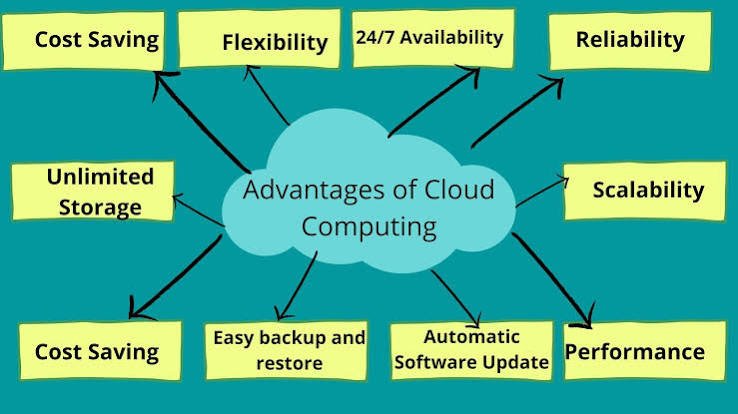
One of the biggest reasons organizations adopt cloud applications is the flexibility they provide. Users can often access their applications and information from different locations and devices.
1. Easy Accessibility
Cloud applications can usually be accessed from anywhere with a suitable internet connection. This is particularly useful for remote workers, students, traveling professionals, and distributed teams.
Instead of being limited to a single office computer, users can work from laptops, tablets, smartphones, or other supported devices.
2. Reduced Infrastructure Requirements
Traditional software systems may require organizations to purchase and maintain physical servers. Cloud applications can reduce the need for organizations to manage extensive physical infrastructure themselves.
This can simplify IT operations and allow companies to focus more on their core activities.
3. Scalability
Cloud environments can provide resources that can be adjusted according to demand. If an application suddenly receives more users, additional computing resources may be available to handle the increased workload.
This flexibility is especially valuable for growing businesses and applications with unpredictable traffic.
4. Automatic Updates
Many cloud applications are updated by the service provider. Users may not need to manually install every software update or security improvement.
This can make software management easier and help organizations access newer features without performing extensive local installations.
5. Collaboration
Cloud applications make collaboration easier because multiple users can often access the same information or work within the same platform.
For example, a distributed team can work on shared documents, communicate through online tools, and manage projects without being physically present in the same location.
6. Cost Efficiency
Cloud applications can reduce certain hardware, maintenance, and operational costs. Depending on the service and pricing model, organizations may pay for the resources or features they actually use.
However, cloud computing is not automatically cheaper in every situation. Organizations should evaluate usage, subscription costs, storage requirements, security needs, and long-term expenses before choosing a solution.
Types of Cloud Applications
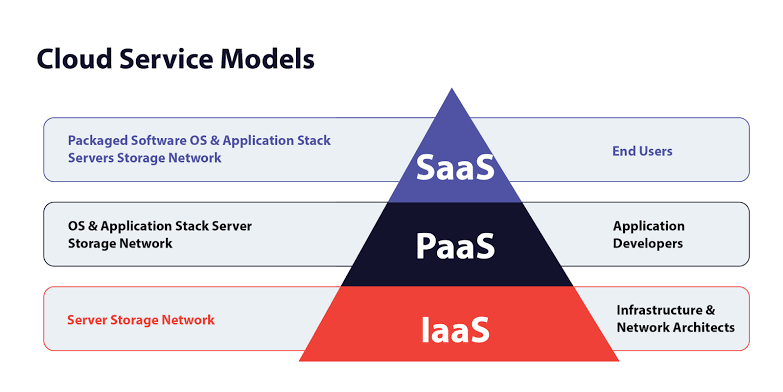
Cloud applications can be categorized in different ways depending on their purpose and architecture.
Software as a Service
Software as a Service, commonly known as SaaS, provides software through the internet. Users generally access the application without managing the underlying servers or infrastructure.
Examples include online office tools, communication platforms, customer management systems, and business applications.
Cloud-Based Business Applications
These applications are designed to help organizations perform business operations. They can include accounting, human resources, inventory management, sales, marketing, and customer support systems.
Cloud Collaboration Applications
Collaboration applications allow employees and teams to communicate and work together online. They may provide messaging, file sharing, video meetings, calendars, document editing, and project management features.
Cloud Development Applications
Developers also use cloud applications for writing, testing, deploying, and monitoring software. Cloud development environments can provide access to computing resources without requiring developers to build extensive local infrastructure.
Cloud Applications for Businesses
Businesses of different sizes can benefit from cloud applications. Small businesses can use them to access professional software without maintaining expensive infrastructure, while larger organizations can use cloud platforms to support thousands of employees and customers.
Cloud applications can also help businesses improve remote work. Employees can access important tools and information without being physically connected to an office network.
For growing organizations, scalability is another important advantage. A company can potentially expand its use of cloud services as its workforce, customer base, or data requirements increase.
However, businesses should carefully evaluate providers before adopting a cloud application. Security practices, data protection, reliability, integration capabilities, pricing, customer support, and compliance requirements should all be considered.
Security and Privacy Considerations
Although cloud applications can provide strong security capabilities, security should never be taken for granted. Organizations and users need to understand how their information is stored, transferred, protected, and accessed.
Strong passwords, multi-factor authentication, appropriate access controls, encryption, regular software updates, and employee awareness can all contribute to better security.
Businesses should also understand where their data is stored and what policies apply to it. Organizations working with sensitive or regulated information may have additional legal and compliance requirements.
A reliable cloud strategy combines provider security features with responsible user and organizational practices.
Challenges of Cloud Applications
Cloud applications offer many advantages, but they also have potential limitations.
Internet dependency is one of the most obvious challenges. If a user has a poor or unavailable internet connection, access to an online application may be affected.
Another concern is service availability. If a cloud provider experiences an outage, users may temporarily lose access to an application.
Data migration can also be complicated. Moving information from one platform to another may require planning, testing, and technical expertise.
Cost management is another important consideration. While cloud services can reduce infrastructure expenses, uncontrolled usage can lead to unexpected costs. Organizations should monitor resource consumption and establish appropriate budgets.
The Future of Cloud Applications
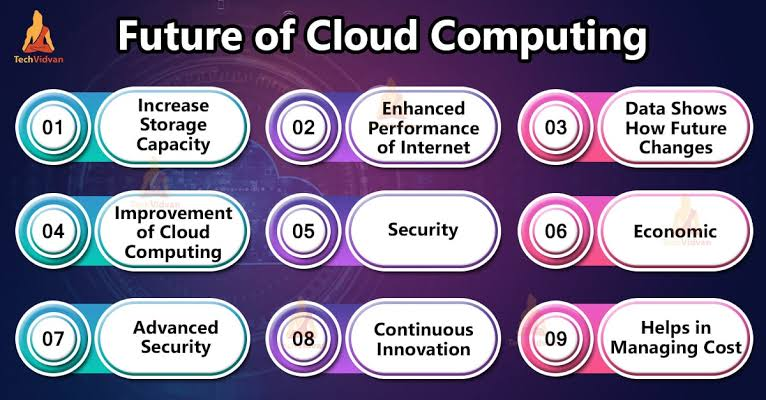
The future of cloud applications is closely connected to developments in artificial intelligence, automation, edge computing, cybersecurity, and data analytics.
Artificial intelligence can make cloud applications more intelligent by helping users analyze information, automate repetitive tasks, generate content, and make decisions.
Edge computing can bring certain processing capabilities closer to users and connected devices, potentially improving response times for applications that require rapid processing.
Cloud applications are also becoming increasingly integrated. Instead of using isolated software tools, businesses can connect applications so that information can move between systems automatically.
As remote work, digital services, online commerce, and connected devices continue to grow, cloud applications are likely to remain an important part of the technology landscape.
Final Thoughts
Cloud applications have changed the way people access and use software. By combining applications with cloud computing infrastructure, they can provide convenient access, flexible resources, collaboration capabilities, and scalable technology.
From personal productivity tools to large enterprise systems, cloud applications are now used across almost every industry. They can help businesses reduce infrastructure complexity and enable users to work from different locations and devices.
At the same time, organizations should consider security, privacy, reliability, cost, and data management before choosing a cloud solution. The right approach depends on the specific needs of the user or business.
As technology continues to evolve, cloud applications will likely become even more intelligent, connected, and capable. Understanding how they work and what they offer can help individuals and businesses make better decisions in an increasingly digital world.